Optimise your e-commerce website performance in 2026
TL;DR:
- Slow pages directly impact UK e-commerce sales by increasing user bounce rates on laggy stores. Regular performance audits using tools like Google PageSpeed Insights or Search Console help identify key issues affecting load time and user experience. Consistent, incremental optimizations—such as image compression, code cleanup, and monitoring—are essential for sustained site speed and improved conversions.
Slow pages cost real money. UK online retailers lose sales daily because customers hit a laggy product page and simply leave, often for a competitor whose store loads in under two seconds. Whether you’re running a Magento build with thousands of SKUs or a Shopify store scaling fast, the performance challenges are real and the impact on conversion is measurable. This guide walks you through a practical, evidence-based optimisation playbook covering assessment, preparation, execution, and long-term maintenance, so you can act with confidence and see genuine results.
Table of Contents
- Assessing your current website performance
- Preparing your Magento or Shopify store for optimisation
- Executing key optimisation actions
- Testing, verifying, and maintaining improvements
- A fresh perspective on website optimisation for e-commerce
- Take your Magento or Shopify store further with expert support
- Frequently asked questions
Key Takeaways
| Point | Details |
|---|---|
| Measure before optimising | Benchmark current performance with real-user data to guide improvements. |
| Platform-specific steps matter | Tailor your approach for Magento or Shopify for maximum effect. |
| Test after every change | Regularly validate performance, especially after updating themes or apps. |
| Small wins add up | Incremental improvements build stronger, faster stores over time. |
Assessing your current website performance
Having established why speed matters, you’ll want to know how your own store stacks up. Before you change a single line of code or disable a single app, you need a clear picture of where you actually stand. Guessing is not a strategy.
The metrics that matter
Three categories of metrics give you a usable baseline:
- Core Web Vitals (CWV): Google’s standard set of user experience signals. The three key ones are Largest Contentful Paint (LCP, measuring load speed of the main content), Interaction to Next Paint (INP, measuring responsiveness), and Cumulative Layout Shift (CLS, measuring visual stability).
- Page load time: The total time from request to fully interactive page. Aim for under three seconds on mobile for retail.
- Conversion rate benchmarks: Industry data consistently shows that each additional second of load time reduces conversions. Even a 100ms delay is felt by users on mobile connections.
Lab data vs. field data: know the difference
This distinction trips up a lot of teams. Lab data is simulated. Tools like Google Lighthouse run tests in a controlled environment and give you a score, but that score doesn’t always reflect what your actual customers experience. Field data, sometimes called Real User Monitoring (RUM) data, is captured from real visits. Google’s CrSUX (Chrome User Experience Report) is the source of field data within PageSpeed Insights.
For retail decisions, CWV field data at the 75th percentile matters far more than a Lighthouse lab score. Why the 75th percentile? Because Google uses it as the threshold for determining whether your site “passes” Core Web Vitals. If 75% of your real users are getting acceptable scores, you’re in the green. If not, your rankings and conversions are likely affected.
Tools to use right now
| Tool | Type | Best for |
|---|---|---|
| Google PageSpeed Insights | Lab + Field | Quick CWV overview with actionable tips |
| Google Lighthouse | Lab | Deep technical audit in Chrome DevTools |
| Search Console (CWV report) | Field | URL-level performance issues at scale |
| GTmetrix | Lab | Waterfall charts and request analysis |
| Shopify Analytics / Magento built-ins | Field | Platform-specific load data |
Start by auditing website performance using PageSpeed Insights for your homepage, a category page, and your best-selling product page. These three represent different template types and often reveal very different issues.
Use monitoring tools to set up ongoing alerts rather than running one-off spot checks. Performance is not a static thing. An app update or a new theme section can introduce regressions overnight.
Also consider using analytics to connect performance data to commercial outcomes. If your bounce rate spikes after a theme update, that’s a signal worth investigating quickly.
Pro Tip: Always re-run your baseline tests immediately after installing a new app, theme, or third-party script. Many regressions are introduced silently and only discovered weeks later when conversion rates slip.
Preparing your Magento or Shopify store for optimisation
Once you have measurements, preparation maximises optimisation impact and minimises risk. Jumping straight into changes without proper groundwork is one of the most common mistakes we see. You can easily make things worse, or introduce bugs that are hard to trace back to their cause.
Step 1: Back everything up
This sounds obvious, but teams regularly skip it when they’re in a hurry. Back up your full site files and your database before touching anything. For Magento, that means your codebase, media library, and database. For Shopify, export your theme files and document all installed apps and their settings.
Step 2: Audit your codebase and installed apps
Follow this numbered approach before starting any optimisation work:
- List every installed app or module. Go through your Shopify app list or Magento module list methodically. Write down what each one does.
- Mark each as active, dormant, or unknown. Dormant means it was installed but isn’t actively used in the current storefront experience. Unknown means nobody on the team is sure.
- Check for JavaScript injection. Many apps inject JavaScript on every page, even if their functionality is only needed on one page type. This is a significant performance drain.
- Review theme customisations. Custom code added by previous developers, agencies, or via Shopify’s theme editor often accumulates over time. Look for redundant CSS, unused sections, and legacy scripts.
- Set your CWV field data benchmark. Capture your current 75th percentile scores for LCP, INP, and CLS. This is your before state, and it’s the number you’ll be comparing against after optimisation work.
Per Shopify’s performance guidance, auditing unused code and modules and prioritising CWV field data over lab scores are foundational steps before any optimisation project begins. We’d apply the same principle to Magento environments.
Magento vs. Shopify: pre-optimisation comparison
| Preparation step | Magento | Shopify |
|---|---|---|
| Backup method | Full server + database dump | Theme export + app settings doc |
| Code audit scope | PHP modules, layout XML, custom themes | Liquid theme files, app scripts |
| Caching layer to check | Varnish, Redis, Magento Full Page Cache | Shopify CDN (largely managed) |
| Deployment risk level | High (server-side changes needed) | Lower (theme-level, sandboxed) |
| Staging environment | Critical to have in place | Use unpublished theme as staging |
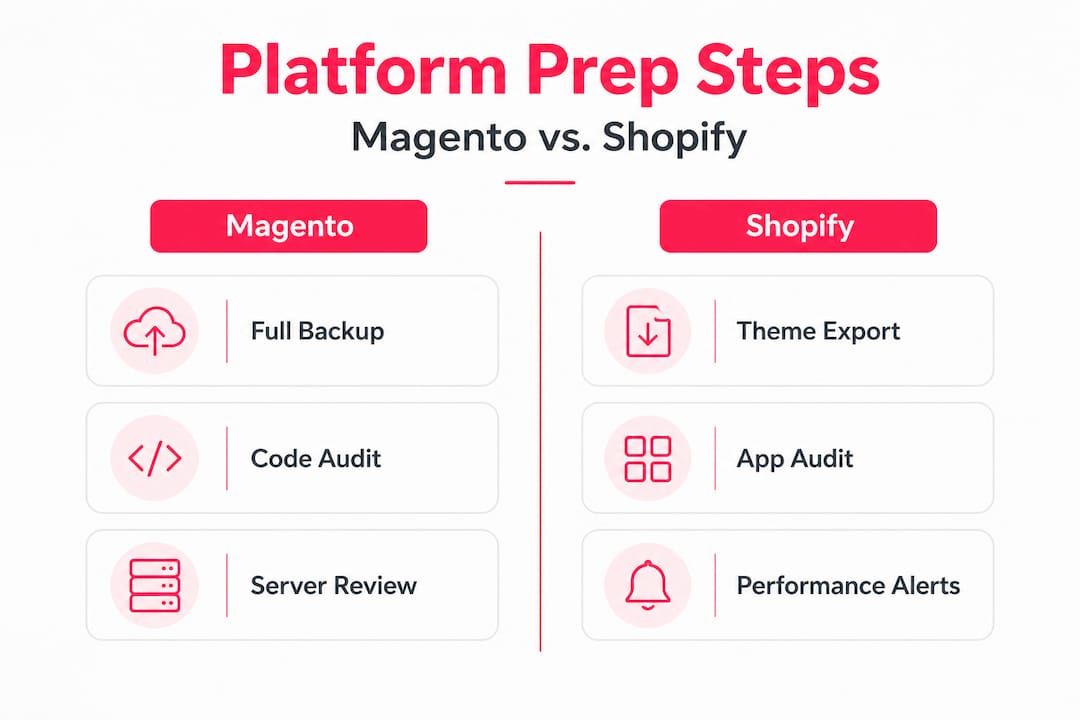
Magento builds carry more complexity and deployment risk. That’s not a criticism; it’s the nature of a highly configurable platform. For those builds, look at essential retail features when reviewing whether your current modules and extensions are genuinely serving commercial needs, or just adding weight.
Executing key optimisation actions
With preparations complete, now implement the optimisation strategies for measurable results. This section covers both universal actions and platform-specific steps. Do these in sequence where possible, so you can attribute any improvement or regression clearly.

Universal optimisation steps
Follow these in order:
- Optimise images. Images are consistently the biggest contributor to slow LCP scores. Convert to WebP format, compress without visible quality loss, and ensure correct sizing for the display dimensions. Avoid serving 2000px images in a 400px container.
- Enable lazy loading. Images below the fold should load only as the user scrolls towards them. This reduces initial page weight significantly, especially on category and listing pages with many product thumbnails.
- Minify CSS and JavaScript. Remove whitespace, comments, and redundant characters from your front-end code files. Both Magento and Shopify have built-in or extension-based tools for this.
- Reduce third-party scripts. Every external script, whether it’s a live chat widget, marketing pixel, or review tool, adds load time. Audit which ones fire on every page and whether they need to. Load non-critical scripts asynchronously or defer them.
- Remove unused apps and modules. Not just disabled. Fully removed. Disabled apps on Shopify can still inject code. Disabled modules on Magento can still affect compilation and load processes.
- Review and optimise fonts. Custom web fonts can add several hundred milliseconds to load time. Use system fonts where possible, or self-host web fonts with proper preload hints to stop them blocking render.
Magento-specific actions
- Enable Magento’s Full Page Cache (FPC) and configure Varnish as the caching application for production environments. This alone can reduce server response times dramatically.
- Use Redis for session and cache storage rather than relying on file-based caching.
- Review your Hyvä frontend if you’re on a modern Magento build. Hyvä replaces the bloated default Luma frontend with a performance-first approach, and the results are consistently impressive. LCP improvements of 50% or more are not unusual in our experience.
- Enable JavaScript bundling and merging carefully. It’s not always the right call in modern setups, but for older Magento themes it can reduce the number of HTTP requests significantly.
Shopify-specific actions
- Review your theme’s section rendering. Unused sections left in the theme still add to theme file weight. Clean these up.
- Audit app embeds in the Shopify theme editor. Some apps add embed blocks that load even when not visually active.
- Consider a Magento speed approach for inspiration even if you’re on Shopify; the underlying principles of caching, image optimisation, and script management apply across both platforms.
- Use Shopify’s Online Store Speed report in the admin to track your speed score over time, and investigate any drops immediately.
Per Shopify’s developer documentation, monitoring for regressions after app or theme changes is an ongoing, non-negotiable practice, not a one-off task.
Also consider how key UX features interact with performance. A fast site that’s hard to navigate still won’t convert. Performance and UX are two sides of the same coin.
Pro Tip: Change one thing at a time, then retest before moving to the next action. This way, you can attribute improvement or degradation precisely and avoid compounding changes that are hard to unpick later.
Testing, verifying, and maintaining improvements
After executing optimisations, it’s crucial to confirm and maintain your site’s newly improved state. Deploying changes and then forgetting about them is how performance regressions creep back in unnoticed.
How to validate your improvements
- Run PageSpeed Insights again on the same three pages you tested at baseline: homepage, category page, and top product page.
- Compare lab scores first for a quick directional read, but wait for field data to update (typically a 28-day rolling window in CrUX) before declaring a win.
- Check CLS carefully. Layout shift issues can be introduced by image dimension changes or lazy loading implementations if done incorrectly.
- Test on real devices, not just desktop simulators. Use an actual mid-range Android device on a 4G connection. This reflects the majority of UK e-commerce mobile traffic far better than a simulated throttled connection on your development machine.
“CWV field data at the 75th percentile is the standard Google uses to assess your site’s real-world performance. Lab scores are useful for diagnosis; field data is what counts for rankings and for your customers.” — Shopify Developers performance best practices
Establishing a routine for long-term maintenance
One round of optimisation won’t hold forever. Here’s a sensible maintenance rhythm:
- After every app, plugin, or theme change: Re-run PageSpeed Insights and check your Shopify speed score or Magento performance metrics immediately.
- Monthly: Review your Search Console Core Web Vitals report for any newly flagged URLs.
- Quarterly: Run a full audit of installed apps and modules. Ask the same question each time: is this still earning its place on our site?
- Annually: Revisit your entire front-end architecture. Is your theme still fit for purpose? Are there platform updates or modern tooling options (like a Hyvä migration for Magento) worth considering?
Maintain a simple log of every change made and its measured impact on CWV and load time. A basic spreadsheet works fine. Over time, this log becomes genuinely valuable: it shows which types of changes drive the most gains on your specific store, and it protects you when a future change causes a regression and you need to trace the cause quickly.
For approaches to long-term optimisation that go beyond technical tweaks and into broader commercial growth, it’s worth reading up on how performance sits within a wider store strategy.
A fresh perspective on website optimisation for e-commerce
Here’s an honest observation from over 17 years of optimising e-commerce sites: most UK brands dramatically overinvest in big-bang redesigns and dramatically underinvest in the steady, incremental performance work that drives sustainable growth.
We see it regularly. A brand spends six months and a significant budget on a full site redesign. The new site launches looking great. Then, six months later, performance has drifted back down because nobody owned the ongoing monitoring. The redesign solved the aesthetic problem but not the operational one.
Speed-driven sales results don’t come from one-off projects. They come from treating performance as a continuous business discipline, the same way you’d treat stock management or customer service. That means owning your Core Web Vitals scores the same way your commercial team owns revenue targets.
The other thing we’d push back on is the idea that CWV is a technical concern for developers only. It isn’t. LCP tells you how fast your biggest content element loads for three quarters of your customers. CLS tells you whether your pages jump around and frustrate people mid-scroll. These are user experience signals with direct commercial consequences. If you’re an e-commerce manager or business owner, these metrics belong in your weekly review, not just your developer’s backlog.
Small, consistent improvements compound. A five-point LCP improvement here, a CLS fix there, an unused app removed each quarter. Over twelve months, that accumulation of marginal gains often outperforms a single large investment. We’ve seen stores double their CWV pass rates without a single major project, purely through disciplined incremental work.
If you want to go further, advanced growth strategies combine performance improvements with conversion rate work, search, and lifecycle marketing for compounding commercial results. Performance is the foundation. Everything else builds on top of it.
Take your Magento or Shopify store further with expert support
If working through performance audits, platform-specific technical changes, and ongoing monitoring sounds like a stretch on top of running your business day-to-day, you’re not alone. It’s exactly why specialist support exists.

At Big Eye Deers, we’ve spent over 17 years building, optimising, and supporting high-performing Magento and Shopify stores for growing and enterprise UK retailers. We don’t just run one-off audits; we build the monitoring and maintenance habits that keep performance gains locked in. From Hyvä frontend migrations on Magento to Shopify theme performance reviews, our team can identify and resolve the issues that are genuinely costing you revenue. If you’d like to understand what’s holding your store back and what to prioritise first, get in touch with us for a straightforward conversation about where we can help.
Frequently asked questions
What are Core Web Vitals and why do they matter for UK e-commerce sites?
Core Web Vitals are Google’s three key user experience metrics covering load speed, interactivity, and visual stability. Poor scores affect your search rankings and reduce customer conversions, with CWV field data at the 75th percentile being the threshold Google uses to assess your real-world performance.
How often should I audit my online store’s performance?
You should audit immediately after every major theme, app, or module change, and schedule a full review quarterly. Per Shopify’s best practices, monitoring for regressions after changes is an ongoing discipline, not a one-off task.
Which UK e-commerce platforms need optimisation the most?
Both Magento and Shopify require routine performance attention due to their complex codebases, third-party integrations, and the cumulative weight added by apps, themes, and customisations over time.
What’s one thing I can do today to speed up my site?
Remove or fully uninstall any apps, modules, or plugins not in regular active use. Auditing unused code is one of the highest-return actions you can take immediately, with no development cost required.
Recommended



Adobe Commerce (Magento)
Formerly known as Magento, Adobe Commerce is built for complex catalogues, integrations, and long term growth. We design and develop stable, scalable stores that support demanding eCommerce requirements, including multi-store setups, complex pricing, and Hyva based performance improvements.

Bespoke Build
We design and build custom eCommerce platforms for businesses with complex workflows, integrations, or non standard requirements. Built from scratch around your business needs using Laravel and modern architectures.

Working with brands across the UK from our offices in Cardiff and Exeter, you deal directly with a senior team of designers and developers specialising in Shopify, Magento, WordPress and bespoke eCommerce platforms.
We focus on commercial outcomes. Better conversion rates, strong SEO foundations and eCommerce platforms that continue to improve long after launch.